
Pocket Option guide: login, demo and a first trade
What an account costs to open, which promo code is live, how deposits and withdrawals behave, and how the signals panel works once you are inside. Every screen below is from the platform itself.
Partner link. How that works.
 Promo code 50START · 50% on the first deposit
What Pocket Option is
Pocket Option is a binary options platform that opened in 2017 and is the most searched of the six covered on this site. It sells the product under its own name rather than a renamed one: the interface says binary options and quick trades, not fixed time trading.
The mechanic is the one set out on the home page. A stake goes on an asset finishing higher or lower by a set moment, the payout rate is agreed before the trade opens, and a wrong call costs the whole stake. Nothing is managed while the trade runs and, on standard binaries, nothing is closed early.
What separates Pocket Option trading from the rest of this group is how little it asks to begin. Ten dollars funds an account and one dollar opens a trade, and the demo runs before either. Everything below follows the order an account is used in, so this is Pocket Option explained from the outside in: sign up, verification, deposit, a first trade, signals and withdrawal.
Opening an account
The demo opens straight after registration and costs nothing, so there is a free version of every screen below. When you do fund the account, keep the first deposit at an amount that would not matter if it went, and read the payout rate printed next to each trade before committing to it.
18+ Partner link. This site earns a commission if you open an account through it, at no cost to you, and it does not change what is written here. How that works. Trading binary options carries a high risk of losing money.
Why traders consider Pocket Option
Five things come up again and again in searches about this platform, and all five are things you can check yourself in the first ten minutes.
-
The entry cost is among the lowest of the six A funded account starts at $10 and a trade at $1. Small enough to learn on without the size of the stake doing the teaching for you.
-
A $50,000 demo, with no deposit and no time limit It opens the moment you register, refills when it empties, and switching between the demo and Pocket Option live trading is a dropdown rather than a second login.
-
Expiries from three seconds to four hours The widest range on this site at both ends. Three seconds is closer to a coin toss than to analysis, but the choice is yours rather than the platform's.
-
Signals you can copy from other traders A live panel inside the terminal showing what other accounts are trading, with a copy button and a count of how many people took each one.
-
It stays open at weekends Through OTC assets, which keep trading when exchanges are closed.
One more thing is obvious the moment you log in: the account is built like a game as much as a terminal. The left rail carries achievements, tournaments with prize pools, a daily bonus, a referral programme and a promotions tab, and the platform pushes all of it at you. It is enjoyable, and it is designed to increase how often you trade. Both of those are true at once, and knowing which one is working on you at a given moment is most of the skill.
- Achievements
- Tournaments
- Daily bonus
- Promo codes
- Referral programme
- Cashback
Where Pocket Option works and how you pay
Registration is open from anywhere. What changes from one country to the next is not whether you can have an account, but which payment methods appear when you go to fund it.
The deposit screen starts with a country selector, and the list underneath it rebuilds around your answer. Cryptocurrency is the one constant. Tether, Bitcoin, Litecoin, Ethereum and USDC are offered everywhere the platform operates. On top of that sit local options that only exist in the regions they serve: bank cards in some markets, mobile money and local wallets in others, bank transfer where it is supported.
The practical consequence is worth planning for. In regions where crypto is the only route, funding the account means owning some first, and that is a separate step with its own fees. In regions with local wallets, deposits usually land instantly and cost nothing. Either way the money comes back out the way it went in, so the first choice is also the withdrawal route.
Pocket Option is one of the most searched platforms in India and Nigeria, and accounts open normally in both.
Pocket Option sign up and login
Pocket Option sign up is short. Pocket Option registration takes an email and a password, or a Facebook or Google account, and asks for no identity documents at all.
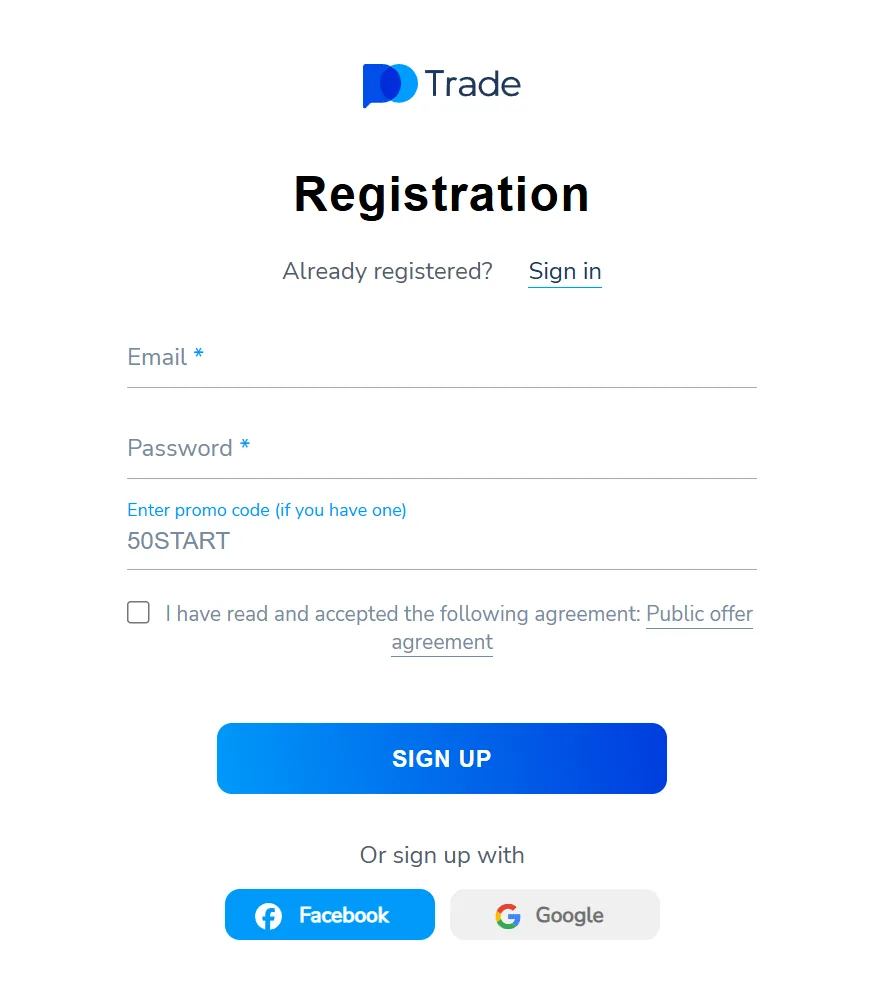
There are four fields and one of them is optional. Email, password, the promo code box, and the checkbox confirming you have read the public offer agreement. If you intend to use a code, put it in here rather than later. The one shown in the screenshot, 50START, is the current 50% deposit bonus and is covered in full further down.
Signing up with Facebook or Google skips the password but not the rest, and a Pocket Option sign in afterwards goes through the same button. Either way the account exists immediately and lands on the demo balance, so you can look around before deciding anything.
Confirm the email address when the message arrives. The account works without it, but withdrawals will not proceed until it is done.
Then set up two-factor authentication in the profile settings. A Pocket Option login account holds money and, later, identity documents. This takes a minute and is the single most useful minute you will spend on the platform.
Partner link. The promo code field is on that form. How that works.
Verifying your account
Verification is not a gate on using the platform. You can register, deposit, trade and use the demo without completing it, and many accounts never need to.
Where it does come up is at withdrawal, and then only in some cases: larger amounts, a change of payment method, or a request the platform's checks flag. Because of that, the sensible move is to fill in the profile early, while nothing is waiting on it, rather than discovering the requirement with money in the queue.
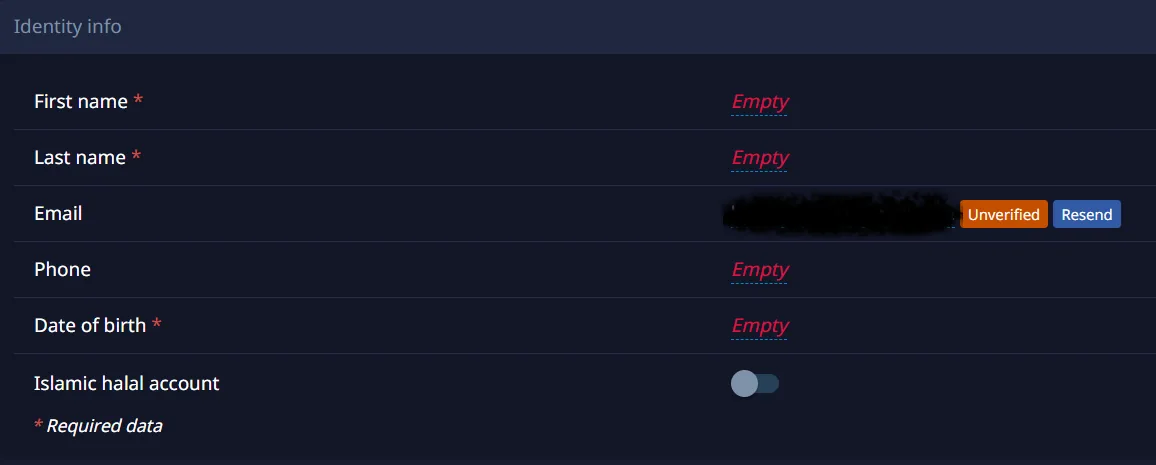
The identity section asks for first name, last name, date of birth and a phone number, with the email confirmed separately. If documents are requested later, Pocket Option KYC asks for the standard set: proof of identity, proof of address, and proof of the payment instrument used for the deposit.
One rule decides whether it goes smoothly. Every name has to match: the profile, the document and the card or wallet. A deposit made from an account in someone else's name is the most common reason Pocket Option verification stalls, and it is not fixable afterwards.
The same screen carries an Islamic halal account toggle, which switches the account to terms without overnight interest. It is worth knowing it exists; whether it resolves the wider question is covered in the FAQ.
Minimum deposit and payment methods
The Pocket Option minimum deposit is $10, there is no commission on the way in or out, and the top-up runs as four steps: pick the method, enter the details, confirm, and wait for it to land.
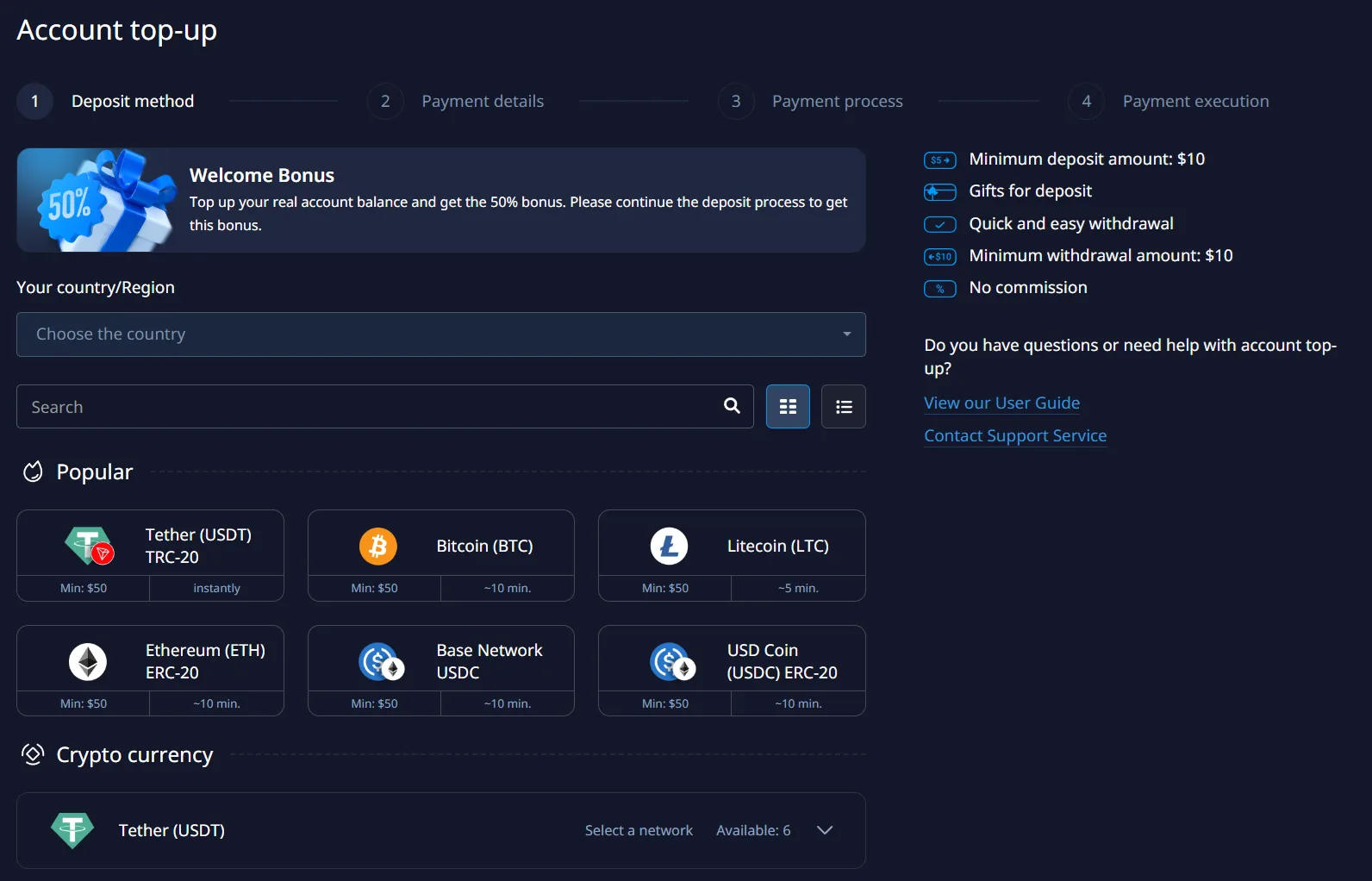
Every Pocket Option deposit method shows two numbers before you commit to it: its own minimum and how long it usually takes. Those per-method minimums are higher than the platform floor. Crypto methods start at $50 rather than $10, and the times range from instant on Tether TRC-20 to around ten minutes on Bitcoin, Ethereum and USDC.
The welcome bonus banner sits above the list because the bonus is applied during the deposit, not afterwards. If you want it, the code has to be on the account before you complete this step. What it commits you to is set out below, and it is worth reading before clicking it.
One thing to get right the first time: the method you deposit with is normally the method you have to withdraw to. Choosing on convenience alone tends to be a decision you meet again later.
How to withdraw from Pocket Option
The minimum withdrawal is $10, the platform charges nothing for it, and in practice most requests clear within minutes. Occasionally one takes longer, and up to three days is the realistic outer edge rather than the norm.
Requests go back to the method that funded the account. Three things have to be clear before one moves: the email is confirmed, the destination matches the source, and no active bonus is sitting on the balance. The third catches people out more than the other two, and it is the reason the promo code section below is worth reading before you take a bonus rather than after.
Demo balances cannot be withdrawn. They are virtual and carry no cash value, so the question, common enough to show up in the search data, has no version where the answer is yes.
One note on evidence. Searches for Pocket Option withdrawal proof return screenshots posted by affiliates, and a screenshot of someone else's payout tells you nothing about your own account: it is trivially faked, and a genuine one only shows that the platform paid that person on that day. Your own first small withdrawal is worth more than any of them, which is why making one early is a reasonable habit.
How to place a trade on Pocket Option
Four decisions go in and one of two results comes out. The terminal puts all four on the right-hand panel, and nothing else on the screen changes the outcome.
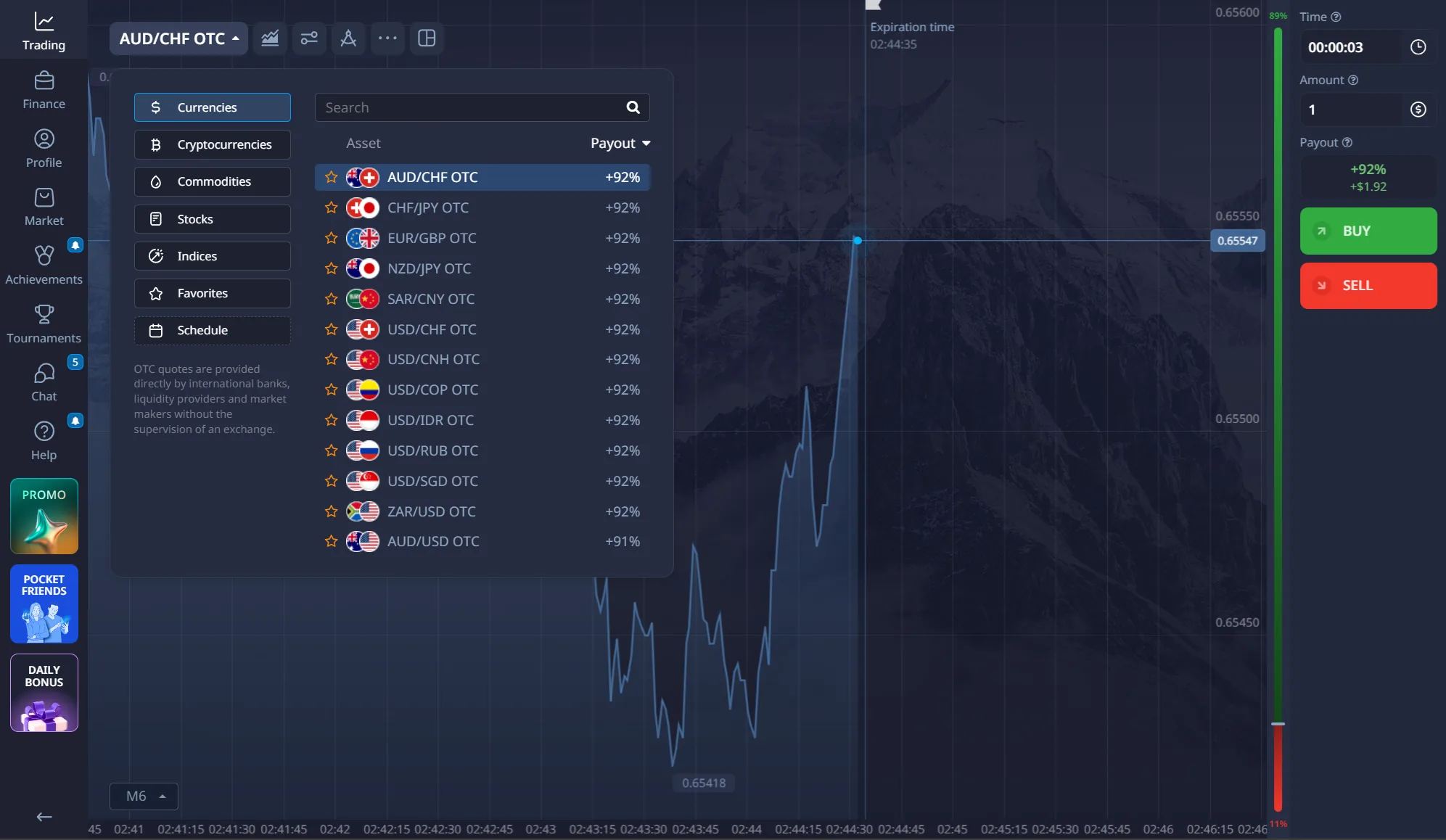
The asset list is split into currencies, cryptocurrencies, commodities, stocks and indices, with a favourites tab and a schedule showing when each one is open. Payouts are printed against every entry, which is the fastest way to see that the headline 92 percent is not a flat rate: it applies to some pairs and not others, and it moves through the day.
Set the amount, set the expiry, then press Buy or Sell. The amount starts at $1 and the timer goes down to three seconds. The payout box between them updates as you change either, showing both the percentage and the cash return. Read it every time, because that number decides the arithmetic. At 92 percent an account needs 52.1 percent of trades correct to hold level; at 70 percent it needs 58.8 percent.
Two features sit beside the basic trade. Double Up adds a second position on an open trade at the current price. Express Trades chain several predictions into one ticket and advertise returns up to 218 percent, paying only if every leg lands. The headline is larger because what is being asked for is less likely.
One label is worth understanding. An OTC asset is one the terminal itself describes as quoted directly by international banks, liquidity providers and market makers rather than by an exchange. That is how the platform stays open at weekends and overnight, and it is also why an OTC chart and a live exchange chart for the same pair will not match tick for tick.
Strategies, and what they are worth
Searches for a Pocket Option strategy outnumber searches for the deposit page. What comes back is a short, repeating list: a Pocket Option quick trading strategy, a Pocket Option zig zag strategy, a Pocket Option binary options strategy that works, Pocket Option tricks. Almost all of it is pattern-reading on a one-minute chart, sold on the claim that the next candle is predictable from the last three.
Hold any of it against the payout arithmetic above. A method that cleared 90 percent at a 92 percent payout would compound an account faster than anything in professional finance, and it would not be distributed as a free PDF. The zig zag indicator repaints, it moves its own past signals as new prices arrive, which is why it looks flawless on yesterday's chart and fails on today's.
What survives is duller and sits outside the chart. How much of the account goes into one trade. How many losses in a row it can absorb. What the payout is on the specific asset and expiry in front of you, before the click rather than after it. That last one is the only edge available on this product, and it is printed on screen for free.
The demo account and the signals panel
Registration opens a demo funded with $50,000 in virtual money. It refills when it empties, runs on the same screens as the live account, and has no time limit. A Pocket Option demo without any sign-up does not exist; a free one does.
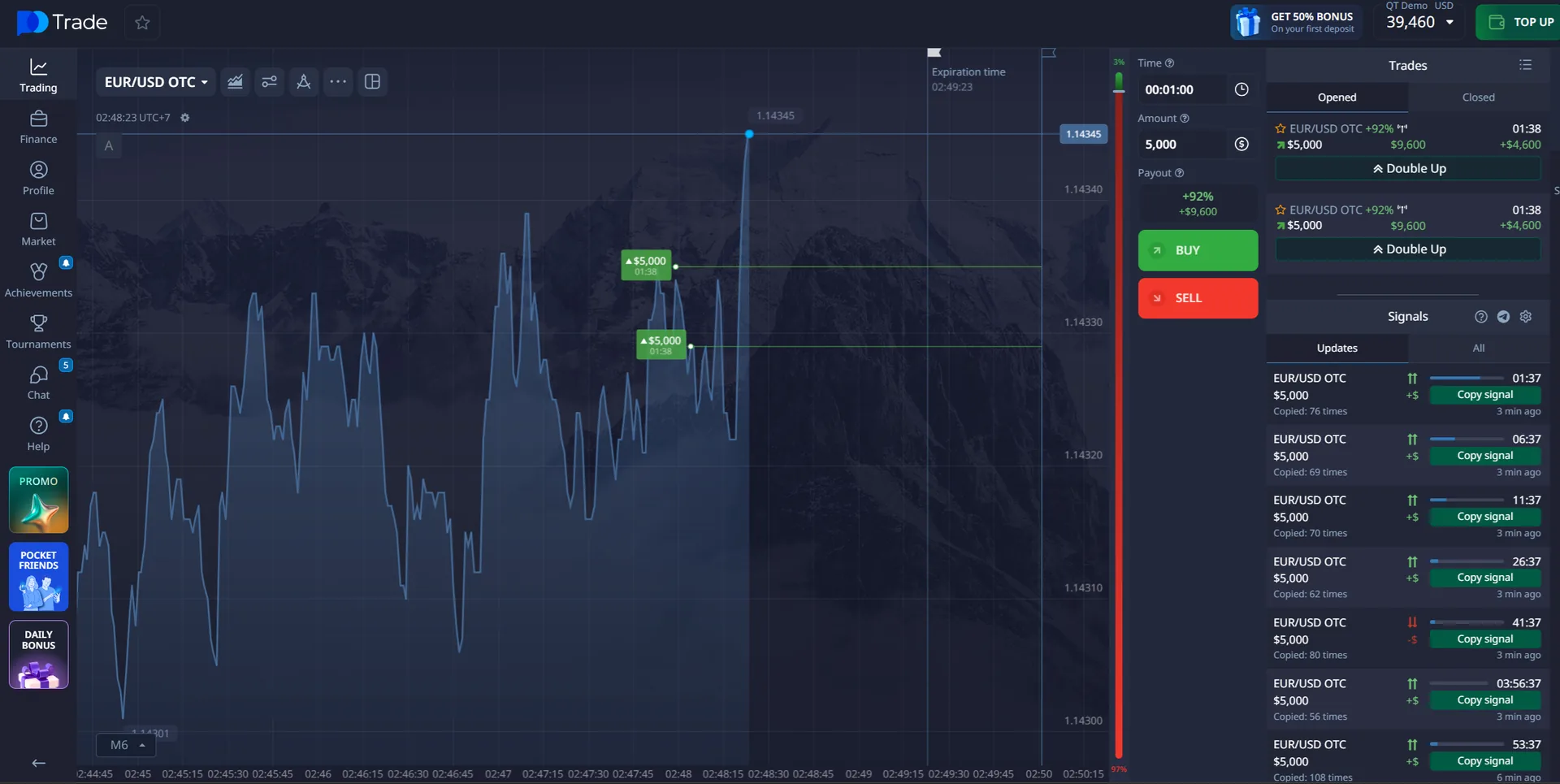
The panel on the right is the part people ask about. Pocket Option signals are live positions other traders on the platform have opened, listed as they happen, not tips bought from a channel. Each row shows the asset, the amount, how long the trade runs and a counter for how many accounts have already copied it. One button puts the same position on your own account.
The copy count is the interesting number. A signal copied eighty times is not eighty independent judgements; it is one judgement and seventy-nine people following it, and they all settle at the same moment. Popularity in that list measures attention, not accuracy.
That is why the demo is the place to use it. Follow the feed on virtual money for a week and you can count how the copied trades finished, rather than how they felt while running. Nothing else on the platform is that cheap to test.
 The signals feed is inside the terminal
Free on the demo account, no deposit needed to watch it run.
Open the terminal
The signals feed is inside the terminal
Free on the demo account, no deposit needed to watch it run.
Open the terminal
The Pocket Option app and where to download it
A Pocket Option app download for Android comes from Google Play, and the platform also offers a direct APK on its official website for devices without Play services. Installing an APK means allowing installs from the browser in Android settings, which is a setting worth turning off again afterwards.
There is no dedicated iPhone app in the App Store. iOS users work in the mobile browser, which carries the same terminal and the same account. A Pocket Option download for iPhone offered anywhere else is not something the platform published.
That matters more here than it would elsewhere. The app handles deposits, withdrawals and identity documents. The only two safe sources are Google Play and the platform's own site: never a file site, a mirror, a Telegram channel or a YouTube description.
Pocket Option for PC is the same web terminal in a desktop browser; there is no separate Windows program for binary options. MetaTrader 4 and MetaTrader 5 are supported for the forex side of the account, separately from the binary options terminal.
Anything else offering a Pocket Option APK is a third party repackaging an app that handles your documents.
Pocket Option promo codes: 50START and what it does
More people search for a Pocket Option promo code than for the login, the demo or the app. The one currently live is 50START: a 50% bonus on the deposit, activating from $50.
Where to put it: the promo code field on the registration form, or the promo section of the account before you complete a deposit. It has to be on the account before the money lands. A code entered afterwards does not apply retrospectively.
Now the part the code pages leave out, and it is the reason to decide deliberately rather than by reflex. A deposit bonus is credit with a turnover condition attached. The Pocket Option bonus becomes withdrawable only after a volume of trading measured in multiples of it, and taking your own deposit out before that condition is met normally forfeits the bonus and anything made with it.
The bonus adds to what you must trade, not to what you can take out. On a product where each trade carries a negative expected value at the advertised payout, being required to trade more is a cost as well as a gift, and the exact turnover multiple and expiry window are shown in the bonus terms on the account. Read those two numbers before accepting.
If you would rather keep the balance clean, decline the bonus and deposit without a code. The platform works identically either way, and a withdrawal from an account with no active bonus has one less condition to satisfy.
Pocket Option bots and signals sold elsewhere
Separate from the signals panel inside the terminal there is a third-party market: Telegram channels advertising Pocket Option free signals, APK files sold as a Pocket Option robot or a Pocket Option signal bot, and Pocket Option AI trading claims attached to all of it. None of it comes from the platform.
Hold the claim against the payout. A service claiming a 90 percent hit rate is claiming a return no fund reports, on an instrument whose break-even at the advertised payout is around 52 percent, and nobody sitting on that kind of edge needs subscribers.
A Pocket Option trading bot asks for your account credentials or an API connection, and the account it reaches holds your money and, potentially, your identity documents. That risk is there whether or not the signals work, and the copy feed inside the terminal does the same job without handing anyone the keys.
Getting hold of Pocket Option customer service
Worth knowing before it is needed rather than during a stuck withdrawal, because one detail changes the answer: live chat is reserved for accounts that have deposited.
That leaves email as the only channel open to someone who has not funded an account yet, and the only channel at all if a login stops working. The Pocket Option email address and phone line are published in the contact section of the platform's own site. Take them from there rather than from a search result, because support impersonation is a common way trading accounts are taken.
Keep the correspondence. A written record of what support said is the only documentation any dispute will ever have.
Pocket Option review: pros and limitations
Nothing in either column is a matter of taste. Each line is something visible on the screens above.
Worth having
- $10 to open, $1 to trade And no commission on deposits or withdrawals.
- A refillable $50,000 demo No deposit needed, no time limit, switches to live from the same menu.
- Withdrawals usually clear in minutes From $10, back to the funding method.
- A live signals feed inside the terminal Copyable positions with a count of how many took each one.
- Expiries from 3 seconds to 4 hours Wider at both ends than most of this group.
- Crypto funding available everywhere Plus local methods where the region supports them.
Worth knowing first
- Bonuses carry a turnover condition And forfeit if the deposit is withdrawn before it is met.
- Crypto methods start at $50, not $10 The platform floor and the per-method floor are different numbers.
- No iPhone app iOS works in the mobile browser only.
- The gamification is doing a job Tournaments, streaks and daily bonuses all reward trading more often.
Pocket Option vs the other five platforms
Pocket Option vs Quotex is the most searched comparison in this niche, and Quotex vs Pocket Option is the same question typed from the other side. IQ Option, Olymp Trade, Expert Option and Deriv follow.

Pocket Option vs Quotex
The closest match of the set, and the reason people ask which is better rather than which is bigger. Quotex calls the product digital options and runs a leaner interface without the tournaments and achievements.
Quotex calls it digital options

Pocket Option vs Deriv
The two platforms here that differ most. Deriv runs no deposit bonuses, builds automation into the terminal and trades its own synthetic indices around the clock.
Deriv calls it digital options, synthetic indices

Pocket Option vs IQ Option
IQ Option is the older name with a more conservative interface and a narrower list of countries it accepts. Where both accept you, the products are close and the payouts are comparable.
IQ Option calls it binary options, digital options

Olymp Trade vs Pocket Option
Mostly a naming difference. Olymp Trade built its interface around the phrase fixed time trading for the same mechanic, which matters the moment two advertised payouts are compared: they are payouts on the same instrument.
Olymp Trade calls it fixed time trading

Expert Option vs Pocket Option
The smallest audience of the six and a stripped-back interface that suits a first account. Fewer assets and fewer features, which for some people is the point.
Expert Option calls it fixed time trades
Pocket Option questions people ask
The wording below is taken from what people type, not rewritten into something tidier.
What is Pocket Option?
Pocket Option is a binary options platform that opened in 2017. A stake goes on an asset finishing higher or lower by a set moment, the payout rate is agreed before the trade opens, and a wrong call costs the whole stake. Accounts start at a $10 deposit and trades at $1.
What is the Pocket Option minimum deposit?
$10 on the platform floor, with no commission charged. Individual methods set their own higher minimums, with crypto deposits starting at $50, and the promo code will not activate below $50 either. The minimum withdrawal is $10.
What is the current Pocket Option promo code?
50START, giving a 50% bonus on a deposit of $50 or more. Enter it in the promo code field on the registration form, or in the account before completing a deposit; it does not apply retrospectively. The bonus carries a turnover condition before it can be withdrawn, and withdrawing your own deposit first normally forfeits it.
Does Pocket Option have a demo account?
Yes, funded with $50,000 in virtual money, with no deposit required and no time limit. It refills when it empties and switches to the live account from the same dropdown. It opens after registration rather than before it.
How do Pocket Option signals work?
The signals panel in the terminal lists live positions other traders on the platform have opened, with the asset, the stake, the expiry and a count of how many accounts have copied each one. One button places the same trade on your account. It runs on the demo too, which is the sensible place to test whether following it works.
How long does a Pocket Option withdrawal take?
Most requests clear within minutes. Occasionally one runs longer, and up to about three days is the realistic outer edge. The minimum is $10, the platform charges no fee, and money goes back to the method that funded the account.
How do I withdraw from a Pocket Option demo account?
You cannot. Demo balances are virtual and have no cash value, so there is nothing to withdraw. Only funds deposited into the real account, and profits made on it, can be taken out.
Is verification required on Pocket Option?
Not to register, deposit or trade. It comes up at withdrawal, and then only in some cases: larger amounts, a changed payment method, or a request that gets flagged. Filling in the profile early costs nothing and removes the one step that can hold a balance.
Is there a Pocket Option app for iPhone?
There is an Android app on Google Play and a direct APK on the platform's own site. iOS is not served by a dedicated App Store listing, so iPhone users work in the mobile browser. An installer from a file-sharing site or a messenger channel is not the app the platform published.
Does Pocket Option work on weekends?
Yes, through OTC assets. Banks and market makers quote them while exchanges are closed, so an OTC chart will not match an exchange chart tick for tick.
Is Pocket Option halal or haram?
Scholars disagree and this site does not issue rulings. The profile carries an Islamic halal account toggle, which removes overnight interest and addresses one of the objections. The others are not affected by it: the outcome is fixed in advance, no asset changes hands, and the counterparty profits when the client loses.
Pocket Option vs Quotex: which is better?
They are close enough that the answer usually comes down to which payment methods work in your country and whether you want the extra layer of tournaments, achievements and bonuses. Pocket Option has them; Quotex is leaner.
Before you deposit
A losing trade with the Pocket Option broker costs the whole stake, so the first deposit should be money you can do without. Trading binary options carries a high risk of losing money, and nothing here is financial advice.
18+ Partner link. How that works.
